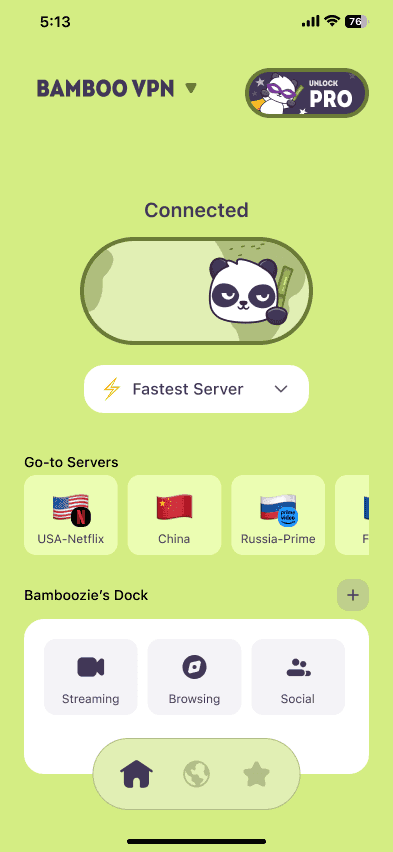
Firefox's built-in VPN is free, and from 10 November 2026 to 31 January 2027 it has no monthly data cap. It's a good way to keep your browsing in Firefox private. But it only protects what you do in Firefox: your other apps, like WhatsApp, your banking app, games, email and other browsers, keep using your normal connection. If you want your whole phone or computer protected, especially on public Wi-Fi, you need a VPN app that covers the entire device.
We make BambooVPN. Facts about Firefox's and Edge's VPNs come from Mozilla, Microsoft and press coverage, checked on 13 November 2026.
What changed with Firefox's free VPN?
Mozilla has built a free VPN into the Firefox browser. You turn it on from Firefox itself and sign in with a free Mozilla account.
- Normally, the built-in VPN includes 50 GB of data a month.
- From 10 November 2026 to 31 January 2027, Mozilla has lifted that cap, so there's no monthly data limit during the holiday season.
- It works in Firefox on desktop (version 149 or newer) and is rolling out to Firefox for Android. It isn't available in every country yet.
- You can choose from a short list of server locations. The exact list depends on your device and Firefox version, so check it in Firefox's VPN settings.
Microsoft Edge has a similar feature, Edge Secure Network: signed-in users get 5 GB of free data a month, it runs on Cloudflare's network, you can't choose a country, and Microsoft says streaming sites aren't routed through it.
How to turn on Firefox's built-in VPN
On a computer:
- Update Firefox to version 149 or newer.
- Click the VPN icon in the toolbar.
- Sign in with your Mozilla account (or create one for free) and switch the VPN on.
On Android:
- Update Firefox for Android.
- Open the three-dot menu, then Settings > VPN.
- Sign in and switch it on. If you don't see the option yet, it hasn't reached your device or country.
What a browser VPN covers, and what it doesn't
A browser VPN only changes the traffic inside that one browser. Everything else on your device ignores it.
| BambooVPN app | Firefox built-in VPN | Edge Secure Network | |
|---|---|---|---|
| What it protects | Every app on your device | Firefox only | Edge only |
| Works on | iPhone, iPad, Android, Windows, Mac (plus a Chrome extension) | Firefox on desktop and Android | Microsoft Edge |
| Choose a location | 50+ locations, grouped by what you're doing | A short list of locations | No, chosen automatically |
| Free option | Free version: a set of free servers, no ads | Free with a Mozilla account | 5 GB a month with a Microsoft account |
| Apps, games, email | Covered | Not covered | Not covered |
| Public Wi-Fi protection | Whole device | Firefox tabs only | Edge tabs only |
On a phone, this matters more than it seems. Most of what your phone sends goes through apps, not the browser: messages, email, banking, social media, photo backups and app updates. A browser VPN doesn't touch any of that.
When a browser VPN is enough
Firefox's built-in VPN is a sensible choice when:
- You only browse in Firefox and want the sites you visit to see a different IP address and location.
- You're on a computer you can't install apps on, such as a work laptop.
- You want quick, free privacy for everyday browsing at home.
When you need a VPN app instead
Use a full VPN app when:
- You're on public Wi-Fi in a hotel, airport or café. Your apps keep talking to the internet in the background, and a browser VPN leaves them on the open network. See is airport and hotel Wi-Fi safe?
- You use apps, not just a browser: banking, messaging, email, games and streaming apps.
- You use more than one browser, or Safari and Chrome on your phone.
- You game. A VPN app can hide your home IP address from other players. See does a VPN reduce ping?
- You travel and want everything on your phone protected, including on a travel eSIM. See our travel VPN guide.
Choose BambooVPN if…
- You want your whole device protected with one tap, on iPhone, iPad, Android, Windows and Mac.
- You want to start free. BambooVPN's free version gives you a set of free servers in the full app, with no ads.
- You want servers picked for what you're doing. The app groups locations into categories like gaming, streaming, social media and work.
- You want extra protection. Pro adds BambooShield, which blocks known ad, tracker and malicious domains across your whole device, and covers up to 10 devices at once. Try it free for 7 days on the yearly plan.
Use Firefox's built-in VPN if…
- You only need privacy in Firefox on a computer or Android phone.
- You're signed in to a Mozilla account and want a free option with no data cap until 31 January 2027.
Can you use a browser VPN and a VPN app together?
You can, but there's little point. Your Firefox traffic would go through two servers, which slows it down without making it meaningfully safer. Pick one:
- Use the VPN app when you want everything covered.
- Use a browser VPN when you only want one browser on a different connection.
If you use Chrome, Edge or Brave on a computer, the BambooVPN browser extension gives you browser-only protection there too, with the same account as the app.
Is a free VPN safe?
A free VPN built into a browser from a well-known company is a reasonable choice for browsing. Be more careful with unknown free VPN apps: if a VPN is free, you should be able to see how it pays for itself. Read how BambooVPN works and who runs it. Its free version has no ads, and it's paid for by Pro subscriptions.
Frequently asked questions
Is Firefox's VPN really free?
Yes. The VPN built into Firefox is free with a Mozilla account. It normally includes 50 GB of data a month.
Is Firefox's free VPN unlimited?
For now. Mozilla removed the monthly data cap from 10 November 2026 until 31 January 2027. After that, the normal monthly limit applies again unless Mozilla extends the offer.
Does Firefox's VPN protect my whole computer or phone?
No. It only protects traffic inside Firefox. Other apps and browsers use your normal connection. To protect the whole device, use a VPN app.
What's the difference between Firefox's built-in VPN and Mozilla VPN?
The built-in VPN is free and covers only Firefox. Mozilla VPN is Mozilla's separate paid app, which protects the whole device.
Does Firefox's built-in VPN work on iPhone?
Not at the time of writing. Mozilla offers it in Firefox on desktop and Android. On iPhone and iPad, use a VPN app such as BambooVPN.
Is Microsoft Edge's VPN unlimited?
No. Edge Secure Network gives signed-in users 5 GB of free data a month, and you can't choose a country.
Is a browser VPN enough on public Wi-Fi?
Only for what you do in that browser. Your other apps keep sending data over the public network, so a device-wide VPN app is the safer choice on hotel, airport and café Wi-Fi.
The bottom line
Firefox's free, now-unlimited VPN is a nice upgrade for private browsing in Firefox. But a browser VPN protects one browser, not your phone or computer. When you're on public Wi-Fi, use apps, game or travel, a VPN app that covers the whole device is what keeps you protected.
Download BambooVPN for iPhone and iPad, Android, Windows and Mac, and start with the free version.
Sources (checked 13 November 2026)
DOWNLOAD THE APP
THE INTERNET IS YOURS. UNLOCK.