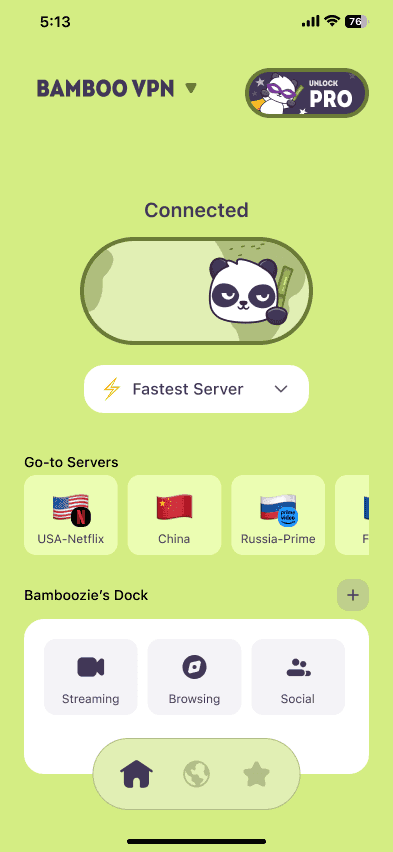
Yes, it's safe to use a VPN for online banking. A VPN encrypts your connection, which matters most on public Wi-Fi in hotels, airports, cafés and planes. The one catch is that some banks treat a VPN login as unusual and ask you to verify it's you. Choosing a server in your home country usually solves that.
We make BambooVPN. This guide is general advice, not advice from any bank. Every bank runs its own fraud checks, so if your bank tells you something different, follow your bank.
Does a VPN make online banking safer?
Your bank's website and app already encrypt your login and your account data. A VPN adds a second layer around everything your device sends, which helps in a few specific ways.
What a VPN protects:
- Your connection on networks you don't trust. On hotel, airport, café or airplane Wi-Fi, the network owner and other users can't see what your device sends.
- Which bank you use. Without a VPN, the Wi-Fi network can usually see the names of the sites and apps your device contacts. With a VPN, it only sees an encrypted connection to the VPN server.
- Your other apps. Your phone keeps sending email, messages and app data in the background while you bank. A VPN app encrypts all of it, not just the banking app.
What a VPN doesn't protect:
- Fake bank pages and texts. If you type your password into a fake site, a VPN can't help. Most bank fraud starts with a message, not a hacked network.
- Malware on your device. Keep your phone and computer updated, and only install apps from the official app stores.
- Weak or reused passwords. Use a unique password and two-factor authentication for your bank.
When should you use a VPN for banking?
| Where you are | Use a VPN? | Why |
|---|---|---|
| Public Wi-Fi (hotel, airport, café, plane) | Yes | It's a shared network you don't control |
| Shared Wi-Fi (student housing, co-working, guest networks) | Yes | Other people use the same network |
| Abroad, on any Wi-Fi | Yes, with a server in your home country | It protects the connection, and your bank sees a home-country IP address |
| Mobile data | Optional | Mobile networks are harder to snoop on than open Wi-Fi |
| Your own home Wi-Fi | Optional | Fine with a password-protected router; a VPN adds privacy from your internet provider |
The FCC suggests that people who use public Wi-Fi regularly consider a VPN, and notes that your mobile data plan may be safer than public Wi-Fi for sensitive information.
Why does my bank block my VPN?
Banks don't block VPNs because VPNs are unsafe. They look at many signals at every login, such as your device, your location and your IP address, to spot account takeovers. A VPN changes your IP address and apparent location, which can look unusual:
- A sudden country change. If you normally log in from Ohio and suddenly appear in the Netherlands, the bank's systems take a closer look.
- Shared addresses. VPN servers are shared by many people, and banks know which IP addresses belong to VPN and hosting providers.
- Jumping between servers. Logging in from a different location every day looks like someone else trying your account.
Usually the result is an extra check: a code sent to your phone, a "we noticed unusual activity" message or a request to log in again. Sometimes the bank refuses the login or locks the account for a while until you confirm it's you.
How to bank with a VPN without getting blocked
- Choose a server in your home country, and stick to it rather than switching every time.
- Use your bank's official app or type the bank's address yourself. Never log in from a link in a text or email.
- Keep your two-factor method handy: your phone number, authenticator app or banking app approval.
- Tell your bank before you travel if it offers travel notices in its app.
- If you're blocked, try another server in your home country. If it still fails, turn off the VPN and use mobile data (not public Wi-Fi) for that login, then turn the VPN back on.
- On Android, use split tunneling if your bank keeps rejecting the VPN at home. It lets the banking app use your normal connection while the rest of your phone stays protected.
Banking abroad: what to know
When you travel, your bank has two reasons to look twice: a new country and a new network. A few habits make it smoother:
- Connect to a server in your home country before you open your banking app on hotel or airport Wi-Fi. The connection is encrypted, and your bank sees a familiar country.
- Use mobile data or a travel eSIM for sensitive tasks when you can. Here's how an eSIM and a VPN work together.
- Avoid shared computers in hotel business centers and internet cafés. Use your own phone or laptop.
- Check the local rules. VPNs are legal in most countries, but not all. See are VPNs legal?
Flying soon? Here's how safe airplane Wi-Fi is, and what to do before you log in at 35,000 feet.
Bank safety checklist (with or without a VPN)
- Turn on two-factor authentication, ideally through your banking app or an authenticator app.
- Switch on transaction alerts, so you know about any payment at once.
- Never share a one-time code. Your bank will never call or text to ask for it.
- Be wary of urgent messages about blocked cards or failed deliveries, especially around Black Friday. Here's how to spot online shopping scams.
- Keep your phone updated and lock it with a PIN or biometrics.
Choose BambooVPN if…
- You want one-tap protection on every network: iPhone, iPad, Android, Windows and Mac, with servers in 50+ locations, including the US, UK, Canada and Australia.
- You want to start free. BambooVPN's free version gives you a set of free servers in the full app, with no ads. It's paid for by Pro subscriptions. Read how BambooVPN works.
- You want extra protection. Pro adds BambooShield, which blocks known phishing, malware, ad and tracker domains across your whole device, plus a Kill Switch, Split Tunneling on Android and up to 10 devices at once. Try it free for 7 days on the yearly plan.
Frequently asked questions
Is it safe to use a VPN for online banking?
Yes. A VPN encrypts your connection on top of your bank's own encryption. It's most useful on public Wi-Fi. Use a trustworthy VPN app and a server in your home country.
Why won't my bank app work with a VPN?
Your bank's fraud checks may see the VPN's IP address as unusual, especially if it's in another country or shared by many people. Switch to a server in your home country, or turn the VPN off for that login and use mobile data.
Should I use a VPN for banking at home?
It's optional. On a password-protected home network, your bank's own encryption protects your login. A VPN adds privacy from your internet provider, but it isn't essential at home.
Can I access my bank account from abroad with a VPN?
Usually, yes. Connect to a server in your home country before logging in, keep your two-factor method handy, and tell your bank you're traveling if it asks you to.
Will using a VPN get my bank account frozen?
It can trigger an extra security check or, occasionally, a temporary lock until you confirm the login was you. It doesn't mean you've done anything wrong. Contact your bank through its official app or phone number if that happens.
Does a VPN protect me from bank scams?
Not on its own. Most bank scams trick you into sharing a password or code. A VPN protects your connection; your own caution protects your account. Blocking known phishing sites, as BambooShield does, adds another layer.
Is a free VPN safe for banking?
It can be, if you know who runs it and how it's paid for. Avoid free VPNs that don't explain how they make money.
The bottom line
A VPN is safe for online banking, and it's a smart choice whenever you're on Wi-Fi you don't control. Pick a server in your home country, use your bank's official app and keep two-factor authentication on, and your bank will rarely question your login.
Download BambooVPN for iPhone and iPad, Android, Windows and Mac, and start with the free version.
Sources (checked 17 November 2026)
DOWNLOAD THE APP
THE INTERNET IS YOURS. UNLOCK.