A VPN browser extension only changes the traffic inside your browser, while a VPN app protects every app on your device: games, email, streaming apps and background updates included. Use the extension for quick, browser-only privacy and location changes, and use the app whenever you want your whole device covered, especially on public Wi-Fi.
Many VPN services, BambooVPN included, offer both. Here's how they differ, when each one makes sense, and how to set them up.
The short answer
- Choose the browser extension if you only need to change your location or hide your IP address from the websites you visit in Chrome, or if you can't install apps on the computer (a work laptop, for example).
- Choose the VPN app if you want everything on your phone or computer protected, if you use public Wi-Fi, or if you game, stream or use apps outside the browser.
VPN extension vs VPN app at a glance
| Browser extension | VPN app | |
|---|---|---|
| What it covers | Only the browser it's installed in | Every app on the device |
| How it works | Routes browser traffic through a proxy server | Creates an encrypted VPN tunnel for the whole device |
| Hides your IP from websites | Yes, in the browser | Yes, in every app |
| Games, email, streaming apps | Not covered | Covered |
| Public Wi-Fi protection | Partial (browser only) | Full device |
| Setup | One click, no system changes | Install the app and approve the VPN once |
| Devices | Chrome, Edge and Brave on a computer | iPhone, iPad, Android, Windows and Mac |
| Best for | Quick location changes and browser privacy | Everyday all-round protection |
How a VPN browser extension works
A browser extension tells your browser to send its traffic through a server somewhere else. The websites you visit see the server's IP address and location instead of yours. Everything outside the browser, like your email app, a game or a system update, keeps using your normal connection.
Most VPN extensions, ours included, work as a proxy for the browser rather than a full encrypted tunnel for the whole device. Websites that use HTTPS (the padlock in the address bar) still encrypt what you send them, as usual.
A good extension also handles a few browser-specific leaks. For example, the BambooVPN extension prevents WebRTC leaks, a browser feature that can reveal your real IP address to a website even when you're connected through another server.
Where extensions shine:
- They're light and fast to switch on and off.
- They don't change your computer's network settings, so they're often allowed on work or school computers where you can't install apps.
- They're handy when you only want one browser on a different location while the rest of your computer stays on your normal connection.
How a VPN app works
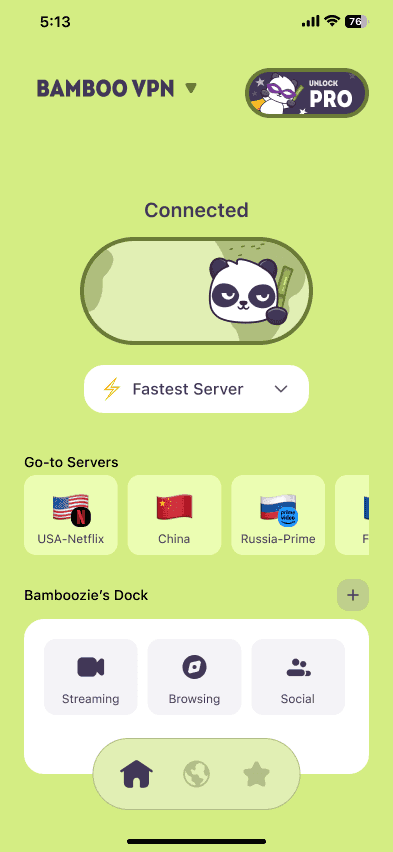
A VPN app creates an encrypted tunnel between your device and a VPN server. All your traffic goes through it, from every app. On public Wi-Fi, that means the network owner and other people on the network can't see what you're doing in any app, not just in your browser.
Apps can also offer features an extension can't. In BambooVPN, that includes server categories for gaming, streaming, music and work, and BambooShield (Pro), which can block known ad, tracker and malicious domains for your whole device.
Where apps shine:
- Public Wi-Fi at airports, hotels and cafés. See our guide to airport and hotel Wi-Fi safety.
- Phones and tablets, where most of your activity happens in apps, not a browser.
- Gaming, where a nearby server can hide your IP from other players and sometimes avoid a bad route. See does a VPN reduce ping?
- Anything outside the browser, like email, messaging and background updates.
Which one should you use?
| If you want to... | Use |
|---|---|
| Hide your IP from websites in Chrome | Extension or app |
| Change your browser's location quickly | Extension |
| Protect your laptop on hotel or café Wi-Fi | App |
| Cover your phone and every app on it | App |
| Use a VPN on a work computer where you can't install software | Extension (if your IT rules allow it) |
| Lower lag or hide your IP while gaming | App |
| Block ads and trackers across the whole device | App (BambooShield, Pro) |
Can you use the extension and the app together?
You can install both, but you don't need to run them at the same time on the same computer. When the app is connected, it already covers your browser. Running the extension on top sends your browser traffic through two servers, which only makes browsing slower.
A practical setup:
- On your phone: use the app.
- On your own laptop: use the app, especially on public Wi-Fi.
- On a computer where you can't install software: use the extension.
With BambooVPN, one subscription covers up to 10 devices at once, across the apps and the extension.
How to set up each one
The BambooVPN Chrome extension (works in Chrome, Edge and Brave):
- Install it from the Chrome Web Store.
- Click the BambooVPN icon in your toolbar (pin it so it's easy to find).
- Pick a server and switch it on.
The BambooVPN app:
- Download it for your device: iPhone and iPad, Android, or Windows and Mac from the download page.
- Open it and allow the VPN configuration when your device asks (only the first time).
- Choose a server or a category and connect.
Frequently asked questions
Is a VPN browser extension a real VPN?
It changes your IP address and location for the browser, but it usually works as a proxy for the browser only, not a full encrypted tunnel for your whole device. For complete protection, use a VPN app.
Does a VPN extension protect other apps on my computer?
No. A browser extension only affects the browser it's installed in. Email apps, games, chat apps and system updates still use your normal connection.
Is a VPN extension enough on public Wi-Fi?
It helps for browsing, and websites with HTTPS stay encrypted. But your other apps aren't covered. On public Wi-Fi, a VPN app is the safer choice because it encrypts everything your device sends.
Does a VPN extension slow down browsing?
Usually only a little, depending on how far away the server is. Choosing a server close to you keeps browsing fast.
Can I use one BambooVPN subscription on the app and the extension?
Yes. One subscription covers up to 10 devices at once, across iPhone, iPad, Android, Windows, Mac and the Chrome extension.
Does the BambooVPN extension work in Edge and Brave?
Yes. It installs from the Chrome Web Store and works in Chrome, Edge and Brave.
What about the free VPNs built into Firefox and Edge?
They work like an extension: they only cover the browser they're built into. See Firefox's free VPN: is a browser VPN enough? for what they cover and when you need an app.
The bottom line
A browser extension is the quick option: one click, browser only, ideal for changing your location or using a computer where you can't install apps. A VPN app is the complete option: it protects every app on your device and is the one to use on public Wi-Fi and on your phone. Many people use both, the app on their own devices and the extension where apps aren't an option.
Get BambooVPN for every device on the download page, or browse privately with our recommended browsing servers.
DOWNLOAD THE APP
THE INTERNET IS YOURS. UNLOCK.